
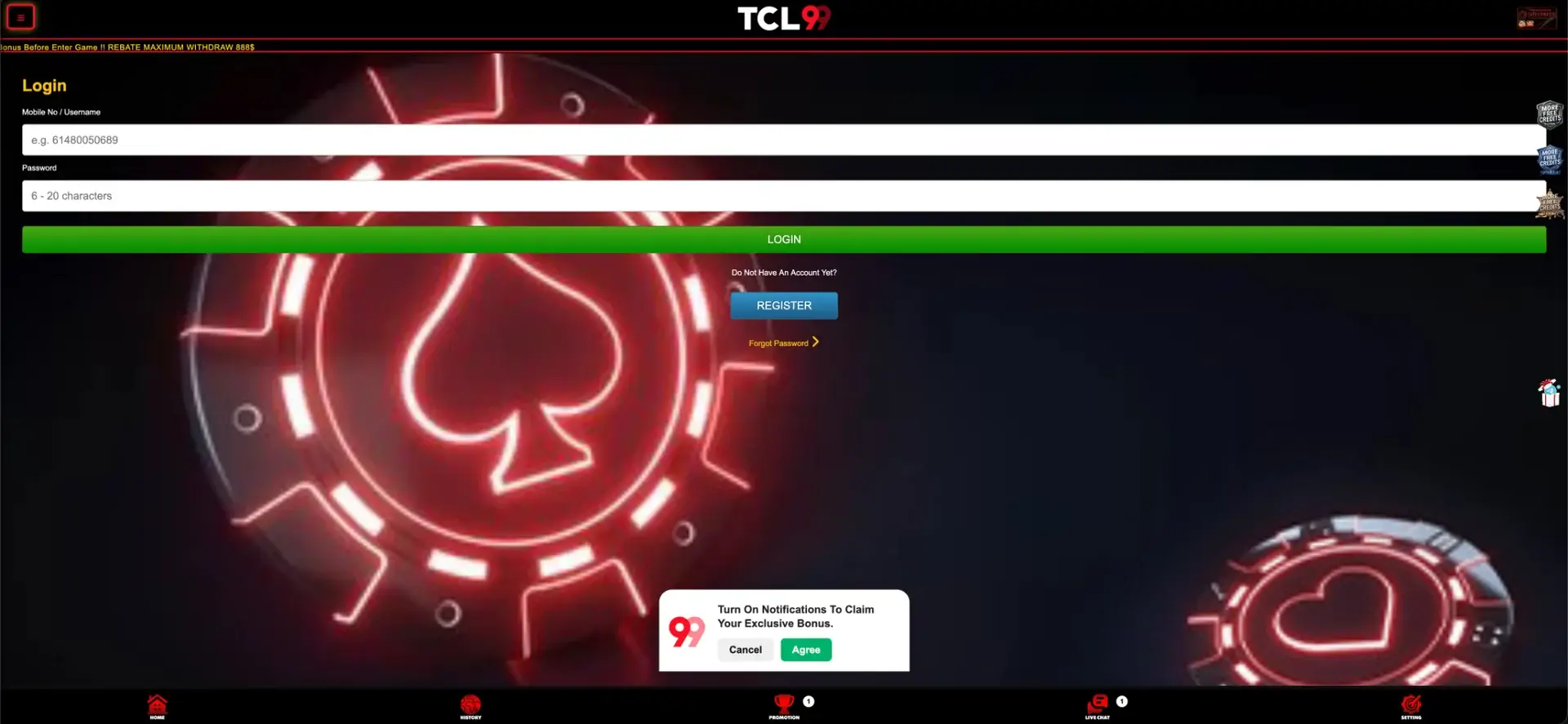
TCL99 login takes two fields: your mobile number or username and a password of 6 to 20 characters. The mobile number is entered in international format with the Australian code 61, for example 614XXXXXXXX, then the green LOGIN button opens the account with its AUD balance, cashier and promotions. If you do not have an account yet, the Register button on the same page leads to a sign-up form with SMS verification, and the Forgot Password link restores access to an existing profile. The login works the same way on desktop, in mobile browsers on iPhone and Android, and through the TCL99 app download offered on the site.
This page covers the full TCL99 casino login process, the difference between logging in and registering, how to recover a password, which errors stop a sign-in and how to fix them, and what becomes available in the account after login. It also explains the account rules that most often cause access problems for Australian players, such as the one-account-per-IP limit.
| Login essentials | Details |
|---|---|
| Where to log in | Login button in the right column or the Login page of the TCL99 site |
| Login field | Mobile No / Username |
| Mobile number format | International, starting with 61 (e.g. 614XXXXXXXX) |
| Password | 6-20 characters |
| Password reset | Forgot Password link under the Register button |
| New accounts | Register button - full name, mobile number, password, SMS code |
| Devices | Desktop browsers, mobile browsers on iOS and Android, app download banner |
| Account rule | One account per IP address |
| Currency after login | AUD |
| Support | Live chat in the bottom menu |
How to log in to TCL99
The login page of TCL99 has a simple layout: a heading, two input fields, a full-width LOGIN button and two links for players without access. The same form opens from the Login button in the right column of the home page, so there is no need to look for a separate address inside the site.
Step-by-step TCL99 login
The whole process takes a few seconds once the account is registered. Follow the steps in this order to avoid the most common input mistakes.
- Open the official TCL99 site in your browser or the installed app.
- Press Login in the right column of the home page.
- In the Mobile No / Username field, enter the number used at registration in the 61 format, or your username.
- Type your password - it is 6 to 20 characters long and should be entered exactly as created.
- Press the green LOGIN button.
- Wait for the balance in AUD to appear in the account panel before opening games or the cashier.
After the first login, the site shows a small prompt offering to turn on notifications for exclusive bonuses, with Cancel and Agree buttons. It does not affect access to the account, so it can be accepted or declined depending on whether you want push alerts about new promotions.
Mobile number format
Most failed TCL99 login attempts come from the phone number format. Australian mobile numbers are usually written locally as 04XX XXX XXX, but the login field expects the international version without the leading zero.
| How the number is written | Works in the login field |
|---|---|
| 614XXXXXXXX | Yes - correct format |
| 04XXXXXXXX | No - local format with a leading zero |
| +61 4XX XXX XXX | Usually not - plus sign and spaces should be removed |
| 6104XXXXXXXX | No - the zero after 61 must be dropped |
If you are unsure which format was used at sign-up, try the number as 61 followed by the nine digits after the zero. That is the same format shown as an example inside the field.
TCL99 login vs registration
Players who have never created an account cannot log in with a phone number alone - the number has to be registered first. The Register button sits directly under the LOGIN button with the note "Do Not Have An Account Yet?", and the registration page has a "Login Here" link for players who already have a profile.
Quick registration flow
Registration at TCL99 is tied to an Australian mobile number and confirmed by SMS. The form has five fields and one button for the verification code.
- Enter your Full Name exactly as it appears on your bank account.
- Enter your Mobile No in the 61 format.
- Create a password of 6-20 characters.
- Add a Referrer Code if a friend invited you - the field is optional.
- Press GET CODE and type the SMS code into the Verification Code field.
- Press REGISTER, then use the same number and password to log in.
The full name matters more than it seems at this stage. Withdrawals are paid to a bank account in the registered name, so a nickname or shortened name creates a mismatch that has to be fixed through support before the first payout.
Password recovery
If the password is forgotten, the Forgot Password link under the Register button on the login page starts the recovery process. The account is created and confirmed through the mobile number, so access to that phone is the key to restoring the profile.
How to reset your TCL99 password
The reset takes a couple of minutes if the registered phone is at hand. Follow the prompts in the order below.
- Open the TCL99 login page and press Forgot Password.
- Enter the mobile number linked to the account in the 61 format.
- Follow the confirmation step sent to that number.
- Create a new password of 6-20 characters that you have not used before.
- Return to the login page and sign in with the new password.
If the registered number is no longer active, the reset cannot be completed on your own. In that case, contact live chat with the full name on the account and the old number, and support will explain how to confirm ownership.
Secure login practices
The TCL99 account holds real money in AUD and is linked to a bank account for payouts, so a few basic habits keep it protected.
- Use a password that is not repeated on email, banking or social media accounts.
- Log in only through the official TCL99 site or the app download button on it, not through links in social media groups or private messages.
- Do not share the SMS code from registration or password recovery with anyone, including people claiming to be support staff.
- Avoid saving the password in shared or public browsers.
- Log out after playing on a device used by other people.
- Check the History section after each login if you suspect someone else has accessed the account.
Live chat is available from inside the site, so any request to "confirm your account" that arrives from an outside number or social media profile should be treated as suspicious.
TCL99 login on mobile
On phones and tablets, the TCL99 login page uses the same two fields and full-width LOGIN button as on desktop. The fixed bottom menu with Home, History, Promotion, Live Chat and Setting stays on screen, so support is one tap away if the sign-in does not go through.
Tips for mobile login
A few settings on the phone make repeated logins faster and prevent errors with the number format.
- Save the site to the home screen of your iPhone or Android device for one-tap access.
- Let the browser keyboard autofill the number only if it is stored in the 61 format.
- If the site offers the app through the Download App Now banner, use the same number and password inside the app.
- Switch between Wi-Fi and mobile data if the login page loads but the balance does not appear.
The same account is used on every device, so there is no separate mobile registration. A deposit made on desktop appears in the balance after logging in on the phone.
Troubleshooting common TCL99 login errors
Most sign-in problems at TCL99 fall into a handful of categories. The sections below cover each one with the steps that usually solve it before contacting support.
Incorrect number or password
The login field accepts the mobile number or username, and the most frequent cause of a failed attempt is a number typed with a leading zero or spaces. Re-enter it as 61 followed by nine digits, then type the password slowly, checking capital letters. If three or four attempts fail, use Forgot Password rather than continuing to guess.
Browser or cache issues
If the login page opens but the LOGIN button does not respond, or the page returns to the form after submission, the browser is usually the cause.
- Clear the cache and cookies for the site, then reload the page.
- Disable extensions that block scripts or pop-ups.
- Try another browser such as Chrome, Safari or Firefox.
- Update the browser to the latest version.
If the problem appears only on one device, the account itself is fine and the issue is local to that browser or connection.
SMS code does not arrive
The verification code during registration or recovery is sent to the mobile number entered in the form. Check that the number is in the 61 format, that the phone has signal and that SMS from unknown senders are not filtered. Wait a minute before pressing GET CODE again, since repeated requests in a short period can delay delivery.
Access blocked by the IP rule
TCL99 allows only one account per IP address. If another person in the same household or on the same network has already registered, a new account from that connection may be blocked. Logging in to an existing account from a shared network is a different case, but if access is restricted, live chat can check the account status.
Site address does not open
Online casino services are not licensed domestically in Australia, and the Australian Communications and Media Authority blocks some gambling addresses. If the usual TCL99 address stops loading, request the current official link through live chat or the app rather than searching for mirror sites, as unofficial copies may be used to collect login details.
What you access after TCL99 login
Once logged in, the right column switches from the Login and Register buttons to the account panel. From there and from the bottom menu, every part of the account is available.
- Balance in AUD with Deposit, Withdraw and Refresh buttons.
- Limits printed under the balance - minimum deposit AUD 10, minimum withdrawal AUD 30.
- Promotion - the welcome bonus of 100% up to AUD 500 + 200 free spins, free credits, rebates, ranking bonuses and rewards.
- History - records of deposits, withdrawals and bonus claims.
- Live Chat - support with a counter for unread messages.
- Setting - account settings.
- Referral panel - Share, Downline, Copy Link and More Info buttons for the AUD 3 per invite programme.
The lobby with pokies, Crash, Fast Game, Live and Sport sections is available before login as well, but real-money play and promotion claims require a signed-in account. Bonuses should be claimed from the Promotion section right after login and before opening a game, as the house rules at the top of the site require.
Account verification
TCL99 confirms the phone number with an SMS code at registration, which is the first level of verification. Further checks are usually connected to withdrawals rather than logins: the payment team compares the registered full name with the name on the bank account receiving the payout.
If additional verification is requested, the documents typically include a photo ID such as an Australian driver licence or passport, and a recent bank statement showing the account holder's name. Having these ready before the first withdrawal request reduces waiting time.
FAQ about TCL99 login
Short answers to the most common questions about signing in to a TCL99 account in Australia.
How do I log in to TCL99?
Press Login on the TCL99 site, enter your mobile number in the 61 format or your username, type your 6-20 character password and press LOGIN.
What phone number format does TCL99 login use?
The international format without spaces or a leading zero: 61 followed by the nine digits of the mobile number, for example 614XXXXXXXX.
What should I do if I forgot my TCL99 password?
Press Forgot Password on the login page and follow the confirmation step sent to your registered mobile number. If the number is no longer active, contact live chat.
Can I log in to TCL99 on my phone?
Yes. The login works in mobile browsers on iPhone and Android and through the app offered by the Download App Now banner on the site, using the same number and password.
Why is my new TCL99 account blocked?
TCL99 allows one account per IP address. If an account has already been registered from the same network, a second one may be blocked. Live chat can confirm the reason.
Do I need to log in to play TCL99 pokies?
The lobby can be browsed without an account, but real-money play, deposits, withdrawals and bonus claims require a TCL99 login.